Two current themes in social studies education — the emphasis on “doing history” and the integration of technology — intersect with the use of electronic or Web-based primary sources in the classroom. Digital libraries now make these resources available to students and teachers interested in accessing rare and valuable primary documents in order to study the past. The documents provide eyewitness accounts to history from a variety of perspectives — almost the entire social spectrum is represented. One such digital library, Documenting the American South (DocSouth; see http://docsouth.unc.edu), developed by the University of North Carolina at Chapel Hill University Libraries, offers teachers and students the ability to download firsthand accounts related to North Carolina and Southern history. In large part due to feedback from teachers around the world, the board of directors of DocSouth aim to make this collection more user friendly. They have already added a Classroom Resource (see http://docsouth.unc.edu/classroom/) page to the Web site and offered summer workshops for teachers.
This research study focuses on six teachers who attended the Documenting the American South Summer Writing Institute in June 2004. It illustrates how the teachers used DocSouth resources in their classroom and suggests ways to improve the Classroom Resource page and future professional development workshops. The findings of this study suggest that teacher investment in professional development can lead to technology integration and meaningful instruction in historical thinking skills and content knowledge. However, the extent of the integration is mediated by hindering factors such as lack of time, curricular pressures, and poor equipment.
Interviews conducted during the course of the study reveal that participants saw great potential for teachers to use DocSouth in their classrooms, since both they and their students have the requisite technology skills, the teachers already use the Internet to plan instruction and for research purposes, and perhaps most importantly, part of their goal in teaching history is to present multiple perspectives. Although these teachers found DocSouth to be a valuable resource, they were limited in their use of the digitized primary sources it contains by the standard course of study, content requirements, time constraints, and equipment issues.
Connections to Literature
Doing History
Recent research in social studies learning has de-emphasized student memorization of facts and text-based instruction in favor of engaging students in historical inquiry or doing history (Barton & Levstik, 2003; Downey & Levstik, 1998; Foster & Padgett, 1999). The literature suggests that one of the best ways to engage students is through the use of primary source documents, since they enable students to develop historical thinking by examining original evidence. According to Milson (2002), “The research base has indicated that students learn history most effectively when they are engaged in asking historical questions, collecting and analyzing historical sources, and determining historical significance” (p. 348). In addition, social studies educators argue that using primary sources improves students’ discipline-based skills and helps them acquire important habits of mind that cross over into various aspects of intellectual life — skills of critical inquiry and other civic-minded skills (e.g. Hicks, Doolittle, & Lee, 2004; Wineberg, 1999).
Technology Integration
With the advent of the Internet and multimedia technologies, teachers can more easily bring primary sources and other real-world social studies learning activities into their classrooms. According to Doolittle and Hicks (2003), “A key assumption of this proposed use of technology is that when used effectively within the K-12 social studies classroom, technology can improve social studies teaching and student performance” (p. 72). As a result of recent research in this field, some scholars are suggesting that social studies teachers integrate technology into daily teaching and learning activities (Berson, 1996; Diem, 2000).
The instructional use of digital primary sources is one of the many possible intersections of technology and social studies instruction. Digital primary sources, often accessible through digital libraries, represent an opportunity to change classroom instruction. Digital primary sources allow for more student-centered instruction by enabling greater individual or group inquiry and access to real-world issues (Roes, 2001). The digital primary sources like the one in DocSouth collections could potentially enliven the past for students by “open[ing] new windows onto an old subject” (Tally, 1996, n.p). Yet, if teachers are to use digital primary sources in a positive way, they need to support and guide their students. The integration of these materials must be done in a way that creates a bridge between the content and the learner’s goals (Edelson & Gordin, 1996).
Minimal research exists relating specifically to the use of Web-based or digital primary sources in the social studies classroom. The current literature related to the use of digital resources most often reviews lists of Web sites and lesson plans. Many articles provide practitioner-oriented accounts that provide teaching scenarios and suggestions for how to use digital resources in the social studies classroom. There is not an adequate research base that examines teacher use of digital primary sources and student learning outcomes.
Professional Development and Technology Integration
There is, however, a significant body of research that examines teacher use of technology in more general terms. This research reveals contributing and hindering factors to technology integration in the K-12 classroom. In their 2004 study of survey data, for instance, Vannatta and Fordham (2004) concluded that the amount of time teachers invest in training and an attitude that is open to change were two factors most likely to effect technology integration. Similarly, Shuldman (2004) determined that time, training, and resources (especially funding) significantly impacted the integration of technology in K-12 classrooms. These studies along with others (e.g. Becker, 1994; Chin & Horton, 1994; Gillmore, 1995) emphasize the important link between teacher training/ professional development and effective uses of technology in the classroom.
Combined, these three areas of literature — (a) the emphasis on doing history, (b) technology integration in the social studies, and (c) professional development to support technology integration — form the context of this research study. This study examines one professional development program that promoted the integration of digital primary sources in the social studies classroom. At this summer workshop teachers were encouraged to integrate DocSouth digital resources to enhance their instruction and allow students to engage in historical investigation.
This study examined the specific benefits to teacher participants while also providing a more nuanced understanding of the factors that contribute to and hinder the use of technology in the social studies classroom in general. The findings of this study reflect previous findings, which suggest that a teacher investment in professional development can lead to technology integration. However, the extent to which teachers integrated technology was mediated by other hindering factors — lack of time, curricular pressures, and poor equipment. In instances where technology was used, meaningful instruction in historical thinking skills and content knowledge occurred.
Context of the Study
Documenting the American South
Digital libraries can link the integration of primary sources with technology in the social studies classroom (Bolick, Hicks, Lee, Molgebash, & Doolittle 2004). As mentioned earlier, digital libraries provide access to primary sources to users all over the world. Rather than depend on visiting archives or looking for a reprint, users can download digitized documents for their own use. In general, there are three identified purposes of online collections: digital libraries serve the needs of the higher education, research community; they play a role in preserving and providing access to cultural artifacts; and they provide content information for precollege learners (Levy, 2000).
The board of directors of DocSouth similarly views the collection as serving the needs of scholars, members of the public, and K-12 audiences. In 2002 head librarian, Joe Hewitt said, “The original purpose of DocSouth was to serve the needs of the large Southern Studies community on the Carolina campus and those of scholars and students of the South around the world.” The DocSouth collections include digitized versions of documents found in the University of North Carolina Library’s Southern Historical Collection, Rare Books Collection, and North Carolina Collection. Along with documents are digitized copies of rare prints and photographs of artifacts — such as coins, uniforms, and war-time propaganda posters.
There are currently 10 collections that make up DocSouth and offer a variety of perspectives on the past. The newest collection (see http://docsouth.unc.edu). The First Century of the First State University chronicles the founding of the university within the context of the historic time period and the surrounding community of Chapel Hill, North Carolina. Another new collection, Oral Histories of the American South, includes searchable audio files and transcripts of recordings collected by the Southern Oral History Project.
True and Candid Compositions: The Lives and Writings of Antebellum Students at the University of North Carolina includes documents written by the university’s students between 1795 to 1868. These resources shed light on campus life, both academic and extracurricular, while also reflecting the impact of national and world events on the university. First-Person Narratives of the American South contains accounts of life in the South between 1860 and 1920. The voices of southerners from various walks of life are included—men and women, Native Americans and immigrants, slaves and freedmen, wealthy and poor citizens, soldiers and noncombatants. The Library of Southern Literature consists of 100 works of Southern literature published before 1920. The collection is based on the recommendations of around 50 scholars of the most important works of the genre and was compiled by Dr. Robert Bain.
North American Slave Narratives provides access to one of the most comprehensive collections of slave narratives in the world. “This collection includes all the existing autobiographical narratives of fugitive and former slaves published as broadsides, pamphlets, or books in English up to 1920” (Documenting the American South, 2004, North American Slave Narratives introduction).
The Southern Homefront, 1861-1865, includes over 400 text resources and over 1,000 digitalized images related to life on the southern home front during the American Civil War. The Church in the Southern Black Community pays particular attention to the role of organized religion in the lives of African Americans living in the South from slavery through the 1920s.
The North Carolina Experience, Beginnings to 1940 focuses all of its attention on the history of the Tarheel state. Again, this collection provides multiple perspectives of people not commonly featured in the history books. North Carolinians and the Great War is devoted to the legacy of World War I in North Carolina history and, as a result, includes documents and other primary sources related to US involvement in the war between 1917 and 1919, as well as the continuing impact of the war into the 1920s. The librarians working with DocSouth are continually in the process of adding new titles and metadata to the collections.
Recognizing the potential usefulness of DocSouth in the K-12 classroom, the leadership of DocSouth aimed to make the resources more accessible to teachers. They acknowledged that although digital libraries contain a great deal of useful information teachers and students need help using them in the classroom. According to Edelson and Gordin (1996), “The problem with simply handing experts’ digital libraries to learners is that the resulting resources will be available but not accessible.” An awareness of issues of accessibility for K-12 audiences led DocSouth to create a site specifically designed for teachers and their students — the Classroom Resources page (see http://docsouth.unc.edu/classroom/).
DocSouth and the Classroom
The classroom resources page is part of an ongoing initiative of DocSouth to develop teacher materials and resources such as lesson plans to support the integration of digital resources in the classroom. Hewitt (2002) outlined this initiative in his address:
All in all, it is clear that DocSouth is providing a useful service to the K-12 population, but the texts alone, without supporting materials, are not quite as useful for K-12 as they are for academics and the general public. We recognize that we have a ways to go in serving this sector well and are beginning to work with [a professor] in our School of Education, to plan some workshops for teachers this summer.
DocSouth teacher workshops began in 2003, and they continue (as of the date of this publication) providing professional development for North Carolina teachers. To date, over 65 teachers have taken part.
The Classroom Resources page is consistently updated, and the bulk of the materials include lesson plans using DocSouth primary sources. The plans are cross-posted with Learn North Carolina. (Learn NC was chosen as a partner since it remains up to date with the North Carolina Standard Course of study and represented another point of access to DocSouth materials.) In addition, a Teacher’s Toolkit provides teachers with activities to incorporate primary source documents in the classroom. Some of the selections in this kit such as “Creating Document Based Questions (DBQs) with the DocSouth materials” and the “You Were There: Witness to History Speech” are intended to encourage teachers in innovative uses of the materials. Others, such as the “Compare and Contrast Chart for Primary Sources” and the “RAFT Assignments and Rubric” (point-of-view writing), are intended as teaching materials to be adapted and possibly integrated into a social studies or language arts learning activity.
DocSouth Summer Writing Institute
The 2004 DocSouth summer writing institute, which is the context of this study, included nine local teachers who commuted daily to the sessions. All of the teachers had attended at least one previous DocSouth summer workshop. A main goal of the summer writing institute was to provide a time and space for teachers to write lesson plans incorporating DocSouth resources. These plans were added to the DocSouth Classroom Resource page and provided the teachers a chance to create plans they could use in their classrooms during the next school year. The agenda for the institute included interactive sessions with college educators, historians/scholars, and members of the library staff (see Appendix A). In addition several hours were reserved each day for research and lesson design.
In terms of content, the institute sessions provided a combination of pedagogy, scholarship, and technical training. The objectives of the sessions included helping teachers navigate the DocSouth site, develop a sense of the depth and scope of the resources, and plan for the integration of the resources in their classrooms. This model is illustrated in Figure 1.
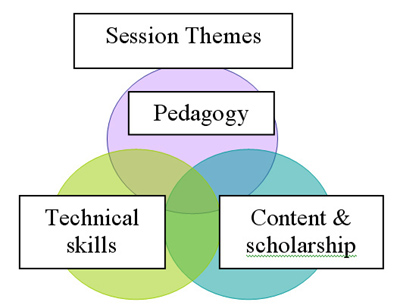
Figure 1. DocSouth summer writing institute session’s thematic organization
As indicated in the diagram, equal weight was given to each of the three themes of the institute. The sessions drew from one or more of these areas and were facilitated by university scholars, school of education faculty members, and members of the digital library staff. Pedagogy focused on the use of digital primary sources to encourage inquiry in the social studies classroom. Content sessions were presented by historians and provided in-depth information on selected topics from the collection. The technical skill sessions provided teachers with a background view of digitization and storage. Teachers also learned how to navigate the DocSouth Web site and download the digitized primary sources for classroom use.
Teachers spent time each day in the computer lab working individually or in groups designing lesson plans. In several cases, teachers continued working on the plans after the institute ended. The lesson plans were to incorporate DocSouth resources, aim toward a middle or high school audience, and include some of the pedagogical strategies introduced over the course of the institute. In exchange for their work, teachers were paid a stipend and received continuing education credits (CEUs). These lesson plans were later edited and posted on the classroom resources page.
Methodology
This research study was conducted in the fall after the summer institute. The research questions that framed this study included the following:
- How did participation in the DocSouth summer institute influence teachers’ classroom practices in integrating DocSouth resources in their classroom activities?
- What were hindering and helping factors in teachers’ use of these resources?
- How can university-based educators support teacher’s use of these materials in the future?
Participants
Of the nine teachers who attended the summer institute, six chose to participate in this study. Remarkably, the participants represented a wide range of teaching experiences, as well as professional backgrounds related to the use of technology (see Table 1). The teachers were solicited by email to take part in the study.
Table 1
Study Participants
Pseudonym | Race | Gender | Years Experience | Grade Level | School Setting |
| Mike | W | M | 8 | 6 | Suburban, public middle school |
| Jeanne | B | F | 20 | 8 | Suburban, public, technology rich middle school |
| Anne | W | F | 6 | 6-8 | Urban, private; (now student teacher with Mike) |
| Jenny | W | F | 8 | 10, 11 | Suburban, public, high school |
| John | B | M | 6 | 12 | Urban, public, boarding school |
| Evan | W | M | 28 | 11 | Rural, public, high school |
Role of the Researcher
According to Glesne (1998) qualitative researchers must acknowledge their subjectivities and monitor the effects on the data collection and analysis. She wrote, “Awareness of your subjectivities can guide you to strategies to monitor those perspectives that might, as you analyze and write up your data, shape, skew, distort, construe, and misconstrue what you make of what you see and hear” (Glesne, 1998, p. 109). I worked closely with DocSouth in the planning and implementation of the Classroom Resources page and the summer teacher workshops. Clearly, I have a vested interest in improving the outreach activities of DocSouth for teachers. By acknowledging this bias from the beginning I consciously checked myself throughout the research process in order to conduct my research in a manner that captured the teacher participants’ experiences. The strategies I employed to monitor my personal bias included submitting the interview transcripts for the participants to check over before I began analysis (a form of member checking), conducting multiple sweeps through the data during coding and analysis, and peer review of my conclusions. By acknowledging possible bias and subjectivities from the outset, I consciously sought to present the teachers’ experiences in the same manner as they shared them with me and allow the teachers’ unique contexts to shed light on their experiences (as recommended in Lincoln & Guba, 1985).
Interview Protocol
I conducted semistructured interviews (see Appendix B) with each of the study’s participants. These interviews lasted approximately an hour and were conducted at each teacher’s school during his or her planning period or before or after school. Every attempt was made to make the interview process logistically convenient for the teachers. Fitting these interviews into the busy schedules of the teachers was often difficult. As a result, follow-ups to the interviews were conducted through email. Over the course of the interviews, teachers answered questions about their integration of DocSouth, along with their general approaches to social studies instruction and the use of technology in the classroom. The interviews were audiotaped and verbatim transcriptions of the interviews were created. Each teacher was assigned a pseudonym to maintain anonymity. The interview transcripts were sent to the teachers for their review before analysis began. During the analysis stage, I read the transcripts multiple times and developed a coding system of key themes using a constant comparative method (Glaser & Straus, 1998). Throughout the process of coding, I wrote out tentative hypotheses which I shared with members of my writing group. This peer review served to check not only the logic of my conclusions but also to monitor possible bias in my analysis.
The major themes emerging from the interviews are described in the following section. This section begins with topics of general importance and moves to more narrow themes specific to the use of DocSouth. Through the voices of the teachers, I demonstrate how the teachers approached technology integration, described the influence of professional development on their practice, and outlined their perceptions of factors hindering their use of technology.
Findings
Interview Themes
Six main themes emerged from analysis of the one-on-one interview data. These themes revealed the teachers’ professional development experiences with technology, their common uses of technology in the classroom, and their more innovative means of integrating technology into the social studies. Other themes emerging illustrated their perceptions of their students’ computer skills, the usefulness of DocSouth in creating social studies lessons, and recommendations for ways to make DocSouth more accessible to teachers. In keeping with qualitative research methods, the words of the teachers are used to define each theme in more detail.
Teacher’s Professional Development with Technology
For many of the teachers interviewed, especially teachers who have been in the profession for many years, professional development related to technology generally occurred onsite. The schools in which they work all had a technology specialist who coordinated the equipment and training for teachers. Interestingly, two of the middle school teachers indicated that, although technology has been emphasized on their campuses in the past, they noticed recent staff development focused on issues related to test achievement. Here, Mike described the new direction the administration at his school has taken regarding teacher professional development:
There was [a push for technology] before the push became equity and closing the achievement gap. In the past two years all workdays, all workshops, all professional development has been pretty much on dealing with racial issues and helping minority students. Before that became the hot topic, a large number of our staff development days were spent doing computer things with the technology specialist where they would meet in the computer lab and it might just be to show us a variety of things teachers might use or might teach with. Some of the teachers that didn’t use computers much, [learned] just basic, very basic stuff like how to use the Internet, like how to use a search engine. So my first few years here, I have been here 8 years, we had a lot of days like that where you could kind of choose the level and someone would be teaching that, so you know, the teachers who have been here 30 years and don’t really use computers they could learn to do basic word processing stuff and more advanced teachers on how to do digital video. So there was a range but, really there has been none of that and when [the gap] closes or when it is perceived to be closed enough and they want to move to something else maybe technology will move back in.
Similarly, Jeanne commented on the waning emphasis by administrators on professional development related to technology:
I know we used to have to have like 30 hrs…now, I think they have kind of put that aside because we are getting where we need to be and they have replaced that again with reading in the content area because I think the reading scores have been skewed at some point on the standardized test.
Interestingly, in both Mike and Jeanne’s situations there was little or no connection made between the use of technology in the classroom and the improvement of achievement for low performing students in in-service, professional development. Rather, by segmenting professional development related to reading in the content area or closing the achievement gap, technology became isolated as yet another in a long line of trends or hot topics in education.
For the three high school teachers, their ability to gain experience using technology in the class resulted more from personal initiative than top-down, administrative desires. Jenny, for instance, was a member of her school’s technology committee (each department was represented by one faculty member). She recalled how she first got involved in the committee:
There was nobody when I first got on the technology committee, which was eight years ago when I first got here (they were just forming the technology committee), and everybody was to send one, and it was all these older social studies teachers [in the department], and nobody wanted to do anything with technology, and I was like, “OK! Fine, I’ll do it.” And I have just been on it ever since.
Jenny’s work with this committee began by default yet opened up new opportunities for her related to technology. For instance, a private company donated a complete “E-instruction” system which included handhelds for all of her students. This system allowed her to assess student progress quickly by quizzing them and receiving instant feedback through their responses on the handhelds. Here, she described the reason the company donated this technology to her classroom:
The handhelds I have…yes that’s how I learned about them [through the committee]. The actual machine I have was given to me by E-instruction to use in the hopes that I would write it up in my action research paper [for her M.Ed. class] and send them a copy of the paper and then they will let me have it… so they can use the research to prove that their equipment helps with test scores.
She presented her experiences using E-instruction in her classroom at a state-level technology conference before an audience of Advanced Placement US history teachers.
For John technology was a way of life at his school, especially in science and mathematics classes. He argued that teachers must seek out the technology they wish to use. He described it as, “Well, you know if you want it [technology], you got it,” but there were no overarching technology initiatives or professional development programs at his high school. It appeared that John was comfortable with this situation since he received fairly rigorous training in technology during his preservice years. In fact, he used his background in educational technology to market himself while he was looking for teaching jobs:
When I came here technology was a major part of my CV, part of my resume. By no stretch of the imagination was I deemed the technology person, but I think within my department I was kind of — I am still not the most savviest person, I am probably third in line, second in line — but, that was my emphasis and that was what people heard and that was part of the reason why they put me in distance learning, and whenever there are issues or problems I am usually the one called to do that sort of thing.
Like Jenny, being considered a person interested in technology allowed John more access to technology-rich teaching situations in the distance-learning center and, within his department, esteem among his colleagues.
Evan described his mastery of computers as “foolin’ around.” Although his school did not provide many professional development experiences related to technology for faculty, Evan continued to use technology in his classroom by including Web sites, computer-based projects, and other resources that he found online. He identified a few key Web sites that he regularly returns to — British Broadcasting (see http://www.bbc.co.uk/), Public Broadcasting (see http://www.pbs.org/), American Memory Collection (Library of Congress; see http://memory.loc.gov/ammem/index.html), and DocSouth — but he generally used a search engine to find new ideas for teaching. In fact he adamantly argued, “There is no excuse for not having a lesson plan because it is all there for you online, so it would be ridiculous for someone to come into a classroom not prepared.”
Traditional Uses of Technology
Participants’ uses of technology, outside of their efforts initiated through the Doc South workshop, were traditional or teacher-centered extensions of previously conceived pedagogies. The teachers all described their perceptions of the value of technology for teaching and demonstrated familiarity with its uses in the classroom. Participants used a range of traditional technologies in their classrooms and desired to expand on their traditional uses toward more technologically enabled student-centered, experiential projects.
All of the six teachers in this study used technology in some form in their classroom. Perhaps due to the emphasis on content-knowledge learning, linked to end of course exams, the most common type of computer technology used by the teachers was presentation software and equipment — especially PowerPoint and LCD projectors used during teacher lectures. Jenny used PowerPoint (which she displayed on a large screen at the front of her room via her “presentation station”) most frequently of the six teachers interviewed. At the time of the study she was in the process of transitioning all of her daily course lectures to PowerPoint presentations.
When asked why she felt PowerPoint was an effective teaching tool, she repeatedly pointed to the visual element of the medium, which gave her the ability to connect images with content. Here she described the “engaging” element of this form of instruction with her Advanced Placement US history classes:
I like that it is engaging. I think students [when] you just do something on the computer they want to look and see what it is. There is so much I can do … even though I lecture, this year I am transferring everything to PowerPoint…. I’m in the process of transferring all of my lectures to PowerPoint and my scores have come up amazingly. And they [the students] said that … even though I don’t put notes up … I just put headings, pictures, and graphs and maps, and things like that…they said just having a visual and just having it almost makes an outline for them in their notes and I notice that a lot more of my students are taking notes. In past years by this point a lot of them have given up taking notes because they just feel way too overwhelmed with everything. And so, now, I’d say all but about five of my students are still taking notes. And their scores are 10-15 points — their class average — is 10-15 points higher than last year.
Similarly, John described his “dependence” on PowerPoint in his Advanced Placement United States history classes where the curriculum was, in his words, “Very content-driven, very, very content-driven.” Like Jenny, John emphasized the visual elements of PowerPoint, as well as its usefulness for efficiently organizing the presentation of content for students. He described his approach to this type of technology in the history classroom as follows:
Well, initially my approach [to technology] was … PowerPoint was a major presentation aid, and I think initially I grew too dependent on PowerPoint, I would use it as … my style is kind of telling a story … lecture kind of. Yes, it was really compact. I taught AP, the students here have to go home every month, and we have a lot less days than the average North Carolina teacher because the students go home a lot — for breaks and other things — we just have a lot less time. So it is a lot more compact. The content has to be first. So in a sense it has to be very teacher oriented, teacher centered. I am giving them information and I am expecting you to process it and do something with it. I give homework assignments using the Internet and using other resources. But with that I use PowerPoint a lot, showing images, art from different time periods, basically, outlining notes.
Here John emphasized the time pressures and demand he felt to cover material — “The content has to be first”— and his reluctant admission that in his classroom this led to “teacher oriented” instruction. Like Jenny, though, he valued the ability to present images along with content via PowerPoint presentations.
Anne described a lesson in which she demonstrated Geographic Information System (GIS) to her students via the LCD projector. In her example, again, the emphasis fell on the teacher’s use of technology — it was used to demonstrate visually to students and teach a conceptual understanding of the social studies. Here, she detailed a geography lesson in which she wanted students to understand a correlation between climate and population density:
It is a Web-based GIS so it’s got the program basically on the Web site. I threw up the rainfall map and I asked, “Where do you guess it will be the most densely populated?” and then they would all guess and they were mostly right. And then I showed them, because you can do it right away, that population density exactly corresponds with rainfall. And then I said, “Where do you think you will find the most airports based on population density?” And then I mapped airports on top of that.
Each of these examples revealed a traditional use of technology. Rather than allowing for increased constructivism and student-centered learning, technology, in these cases, was used by the teacher to cover content. Technology was present but was not in the hands of the students.
Innovative Uses of Technology
Although the teachers reported using technology in the classroom in traditional ways, they also mentioned occasions in which they incorporated technology in innovative ways. Importantly, some teachers talked about a desire to model their use of technology based on colleagues who created student-centered, technology-based projects in their social studies classrooms.
The teachers who used technology in innovative ways put the computers in the students’ hands. Mike, for instance, talked about a project he had done the previous year where, instead of viewing his PowerPoint presentation, the students created their own to share with each other:
At the end of the year, they did PowerPoint shows on something to with Southeast Asia, some type of project, and they could do it with a poster, presentation, some type of report, and a lot of them had chosen to do it in PowerPoint since they had learned how to do it in science.
Jenny’s students created their own PowerPoint presentations during summer school on a variety of topics related to United States history. When asked why she favored the use of computers in this situation, she responded,
One, summer school is a five hour class and you’ve got to break it up … so it’s like, “We’ll do this for a little while and then we’ll go to the computer lab for an hour.” So I do that … but, yes, it helps because, one, it breaks [it] up … and those kids do need something like, you know, it is more engaging to get on the computer.
Jenny pointed to the usefulness of technology to engage struggling students in learning content. The same was true in her experience when it came to her higher ability classes. For those classes she created an assignment in which her students used Apple’s iMovie software to create documentaries and music videos related to history in the last 2 weeks of school.
Yes, they got to chose whatever they wanted, something in history that interested them and so…. I think I had one for each decade — like the 1970s — it had 1970s music and then pictures from the 70s. Two students did conspiracy theories in US history and they started with Lister’s rebellion [and] went through the different conspiracy theories throughout American history. I had one on American psychos — just like crazy people we studied, like Carrie Nation and Aaron Burr [laughs], they picked the craziest people in American history and did a documentary on those people. It was just different stuff. Some on the [American] Revolution and the Civil War, a popular topic. Two kids did a music video on the Civil War, they used Civil War music and used the photographs. And the iMovies, fade in and out — it’s really cool.
Jenny spoke with great enthusiasm about this successful project especially since, when given the opportunity to choose a topic of interest to pursue and synthesize via a multimedia presentation tool, her students developed incredibly creative and personally meaningful final products.
In Evan’s classroom he allowed for student inquiry through the use of WebQuests (Web-based inquiry projects). When I visited him at the high school, for example, he was planning to take the students to the computer lab to explore a Web-based project he had designed related to the turn of the 20th century. Some of the tasks for students included exploring Web sites on the Colombia Exposition in Chicago, Coney Island, and Ellis Island.
All of these examples pointed out a willingness on the part of some of the teachers in the study to try out innovative and nontraditional modes of social studies instruction through the use of technology. At the same time some spoke about the projects of their colleagues who were also using technology in unique ways and expressed a desire to do something similar with their students. Mike and Anne for instance, introduced me to a teacher at their school who used iMovies in her teaching. Mike talked about how interested he would be in learning this technology to use in his own classroom. When Anne told him, “It is easy to learn,” in the interview, Mike replied,
Which I have heard. I don’t know how to use it [but] I have it on my computer at home, although I don’t have a digital video camera. That [iMovie] would be valuable to learn. I do projects where students film themselves, and the ones who are in her class will go down there and work on it,and the ones who aren’t in her class, I am giving them the big, dinosaur cameras, the ones with the tape on the side. And get it right on the first take because there is no editing here. I just don’t know how to use it and I haven’t had the time to learn it. So just things like that would be nice. I haven’t had any training on computer stuff in a few years.
Whereas Mike felt he lacked the training to use iMovies, John described a lack of time that limited his ability to use technology in more innovative ways, although he was aware of how other educators do it:
I think there are ways. You know, teachers find times to bridge that gap. I am sure I could talk to college professors, but the way that she [workshop presenter] used primary sources in the college classroom I think that is awesome. I try to do that kind of stuff too. I want to make it meaningful for students on that level, maybe asking some college professors how they do that too. But I know they are dealing with the time factor too.
Jenny, too, seemed to be encouraged by colleagues to try new things. She said she was “jealous” of her coteacher who used Web logs during the [2004] Presidential debates. When asked what she planned to do in the future with technology she replied,
I’d like to try the blogging sort of thing, kind of like the BlackBoard where kids can post and have discussions. I’d really like to, you know, have a time for that. It would have been great with the debates. I am really jealous that [coworker] got to do that because I think it would be really cool to sit there with all of my students on line and just like watch them comment on things while it was happening. That would have been really cool.
Clearly, Jenny and the other teachers were aware of the potential of technology in the social studies, especially in terms of helping them create student-oriented, meaningful lesson plans. Beyond awareness they demonstrated a real desire to try new things but were limited by their own sense of efficacy and time constraints.
Student Skills
In North Carolina eighth graders take the North Carolina Test of Computer Skills, which includes three major sections related to word processing, databases, and spreadsheets. As such, the three middle school teachers worked alongside the technology specialists at their schools to help the students prepare for the test. Here Jeanne explained how her school approaches this test preparation:
The technology specialist comes into our classrooms — she hits every core subject — math, social studies, science, language arts — she goes over spreadsheets in science and with me she goes over databases. We [go over] hardcopies of multiple choice questions related to computer skills. We go over that in our Cyclone Zone which is our advisory [class] — so we do that on Fridays. We ensure, in sixth and seventh grade, especially in sixth grade, that they take a keyboarding class and then, there is a seventh grade elective that some of the students can take. So we really have like two technology teachers specifically for that. So the only thing that bothers me is that I see a lot more guys in those classes than I see females. But we work with them and really try to prep them as much as we can on this [test]. She [the technology specialist] goes through sorting, and doing fields, and record, you know? And [Microsoft] Access so, she tries to do a very fair job of that.
Similarly, at Mike and Anne’s school the technology specialist trained students on tested skills, and all of the students generally took a typing or keyboarding class. As a result the teachers felt fairly confident in the students’ ability not only to pass the test but to also navigate a computer and various software programs. Mike described the confidence he felt in his students’ ability:
They are all required to take the keyboarding class which focuses mainly on word processing, spreadsheet, and database, which are the three things they are tested on in eight grade computer test. I’d say 95 to 98% pass it the first time through, so they are definitely prepared for it by the eighth grade. When I was teaching eighth grade all of those years, in the fall we would just do a practice for it with the Carolina counties database. And we would spend one block, two periods, like one and a half hours, teaching them to search and sort — the kind of things they have to do on the test. And they … just about everybody would get it so quickly, even if they never used one I think they understand the general idea. I think spreadsheet was a little harder when they asked them to make graphs and the science would handle that part. But by eighth grade they’d all typed enough that word processing is easy. The kinds of things they would have to do are center titles and maybe underline something and bold something and move it to the end.
Jenny, at the high school level, also felt that her students possessed the necessary computer skills to complete computer-based projects. When her students created iMovie documentaries, they depended very little on her knowledge of the program:
J: No, because, one, the kids are pretty apt at using that kind of stuff and we have … we subscribe to Atomic Learning, which is a site that has tutorials for how to use absolutely anything related to technology even as far … not just using the i-movies program but how to prepare a good documentaries in iMovies — “What would you want to start with?” And stuff like that. So my kids used Atomic Learning which we subscribe to. M: So did all of the kids go through each tutorial or just the ones they needed? J: Whatever they needed. And if we were like, “We need to do this” … and a lot of kids are so good at technology, “They are like oh, we’ll just figure it out” — because they are not hard programs to figure out. And if there was a big question we would go into Atomic Learning and find an answer.
Jenny overcame one potentially inhibiting factor to the use of technology — her own low efficacy with the program — by allowing her students to teach each other and have support in the form of an easy to use, straightforward tutorial program.
For these teachers, using computers in the classroom rarely required teaching requisite computer skills to most of their students. However, there were instances when students need remedial help, as Jeanne explained:
Right, right, it’s rare that you have to teach some of these kids different [technology] skills. You know a lot of them know how to do the different attachments, going on to Web sites without any trouble, but we do have a few kids — ESL [English as a second language] kids, first year ESL students who might have come from some third world countries — probably have more difficulty. But we do provide for them because we make sure that they take a computer class.
Along with remedial training in computer skills, most of these teachers taught in local school systems that provided some form of assistance (such as computers on loan and cheap Internet access) to needy families. Amy described one program and pointed out that soon teachers could expect all of their students to have Internet access at home:
I think it is really interesting that when the guy came in to talk about the Internet, he told they kids that if “any of you don’t have the Internet come talk to me and I can get it for you.” And they have this program, they can get you an old computer for lower income families, get Internet free for three months and then you have to pay 10 dollars a month. So 10 dollars per month apparently is discouraging some parents from going ahead and getting it. It is a nice thing to think about, if we really did want all of the kids to access, for example, the research, there are ways of starting to be able to expect that.
Here Anne made an important point that, due to this initiative and others, it is not so unreasonable for teachers to eventually assume that their students have Internet access and know how to navigate the Web.
These teachers felt their students were savvy with computers and also spoke about their belief in the importance of exposing students to technology as it becomes more and more ubiquitous in today’s society. When asked about her approach to technology, Jeanne responded,
Well, since I’ve been teaching a long time and you see a lot of things kind of come and go. Our society has changed, so of course technology changes and so I feel like it would be a disservice if I did not put some of this into my curriculum. What I do now is that when … when I put something new in my lessons, then I do try to see if I could put something with regards to technology in there. Now I am kind of on that bandwagon where I am trying to put down some pencil and paper items and then go to use the technology a lot more.
This sense that it would be a disservice not to include technology in her classroom was shared by Jenny, who always included computer lab time in the daily summer school schedule. Here, she expanded on her reasoning to do this:
Plus it is good for them [the students] to build those computer skills, you know? They need to learn how to use Word, and they need to learn to use PowerPoint, and I think if you can use those the way [computer] programs are written, if you can use basic programs like that, you can generally figure out other programs because then you understand about Help menus and you understand about right clicking, everything is very similar. You can highlight and cut and paste.
Teachers pointed out an added value to technology — enriched instruction — it offered students the chance to develop valuable computer skills while also learning social studies content.
Uses of DocSouth Lessons in the Classroom
Of the teachers interviewed only two, Jeanne and John, referred to the specific use of DocSouth materials in their classroom to teach social studies content. The teachers designed these assignments after attending the workshop. Their approach to integrating these materials in their curriculum provided a nice snapshot of what teachers may look for when they visit the Web site. Jeanne and John used DocSouth to provide multiple perspectives on the historic past in their classroom; in this way the materials supplemented their regular instruction. In Jeanne’s words, “I think … it just really enhances what I do.” The teachers also used the materials to teach their students about critical thinking, analyzing point-of-view, and recognizing literary devices and bias. The teachers assessed student synthesis and analysis of the materials through written assignments such as historical essays.
Jeanne explained that she first used DocSouth after she attended the summer workshop in 2003. At that time she was already having her students read the book, Letters from a Slave Girl by Mary Lyons (1992) , which introduces the story of Harriet Jacobs, a slave that escaped through extraordinary means. According to Jeanne this book provides a “watered-down version” of Incidents in the Life of a Slave Girl (see http://docsouth.unc.edu/jacobs/menu.html) — Jacobs’ narrative, digitized in the DocSouth North American Slave Narrative collection. When she discovered Jacobs’ narrative online through the workshop she immediately incorporated it into her curriculum the following year:
So up until this year, I had just simply relied, well, up to last year, I had simply pretty much relied on that book, but it still doesn’t give enough depth. I think especially for my upper level children. So that is where I use the Web site [DocSouth]. Basically, with my gifted kids, because I feel like they are better able pretty much to understand some of the different concepts there. Say for instance, like in Letters from a Slave Girl when they go over the fact that … some of the sexual issues, you know, that’s kind of watered down. I warn my kids first of all what the Web site is like and you know, “This is actually what she wrote.” So, you know, they won’t be so shocked when they look at that. I also let parents know what is there so they can kind of gauge. I don’t think its anything that is really too far out there that these kids can’t handle as eighth graders. So that’s one of the things. And another thing is the vocabulary that’s used in the actual slave narrative itself. So I really find a lot of value with that particular site when looking at the slave narrative.
DocSouth provided Jeanne’s students the opportunity to learn more about Jacobs’ life and to compare her experience to that of other slaves:
And then again we can go in and compare some people like Lunsford Lane and Frederick Douglass. And then looking at — basically what we look at — we tend to think of just field slaves and not looking at city slaves and town slaves and how life was different for them then. So that site is also of value there because it gives them more information. And it also shows them — instead of me standing up and telling them — it also gives them information from these people that actually experienced being enslaved. So, you know, it is just a very powerful thing.
Jeanne revealed not only her eagerness to present students with multiple perspectives about slavery — the range of experiences — but also the effect it had on changing the emphasis in her classroom from teacher centered to student centered. Her students read the narratives and constructed their own impressions of slavery; they kept track of their understanding with a reading log and then wrote up a final report of their comparisons of the narratives. In the end, she felt it was a very valuable lesson for her students:
Very, very powerful … very powerful. Because, you know, they are looking at it from the perspective of a woman and all of the different things she went through and she persevered and she made it her goal not to be enslaved anymore and just suffered for several years hiding in her grandmother’s little attic space, you know, not even really an attic space. So I have them to tell me, you know, how you feel about certain things and that was certainly one of the comments — that that was one of the best they’ve come across.
Due to the positive feedback she received from her students she planned to continue to include this lesson in her curriculum.
John also used resources from the North American Slave Narrative collection in his humanities classes (a blended United States history and American literature class). In his classes students focused on one slave narrative and examined it from a variety of angles.
I gave an assignment … I listed out about 20-25 of the North American slave narratives. They had to choose from that list — we were talking about slavery and the Civil War — we had just finished up talking about slavery and their experience. I said, “Look at this and examine these documents as a piece of literature. What kind of literary devices are being used by these individuals — these enslaved Africans who were writing? Examine it as a historical document. How does this fit into the story, the narrative that I have tried to tell you the past couple of weeks or days? How does it fit in? Where this guy talks about the Fugitive Slave Act, where does that fit in? And lastly the political — what is the purpose — if it happened before the Civil War — what’s the purpose? Does it fit into the abolition movement? How? And why does it serve that purpose? After the Civil War, what is the purpose of the author? And why do you think it was published?” So that kind of gets to the deeper significance of the slave narratives. So they had to examine all three of those things…. I made them print out the narrative, read it, and write an essay.
John used the narrative to offer his students multiple perspectives about slavery while also giving them a chance to construct their own understanding of history beyond his lectures. He required a final, synthesizing essay that pulled together the literary elements of the story while putting it into perspective.
When asked about the student response to the assignment he said that several students had come to talk to him about the slave narratives and some of their more startling aspects. Based on this, he felt like the students were “really getting into it” although he admitted,
It was an assignment. Some students were really into it — like the students that came to me. Unless they asked. You know, they are not going to just say, “Whoa, I love this!” [laughs] I don’t know if I’ll get that. I don’t know, some might have told me that — or might have felt that but didn’t say because it felt like they were really getting into it.
For these two teachers the experience using digitized primary sources in the classroom dramatically influenced their students’ perspectives on slavery through exposure to a more varied retelling of that historic time. At the same time, greater responsibility rested with the students to construct their knowledge as they were called on to amalgamate the story their teachers had told them with firsthand narrative versions of the events.
Increasing Teacher Use of Digital History Resources
All of the teachers in this study agreed that DocSouth could do more to encourage teachers to use its resources. They offered a variety of opinions ranging from making the materials more teacher friendly to increasing the visibility of the resources available. For instance, they were critical of the too narrow focus on North Carolina and United States Southern history. Although many of their suggestions were specific to DocSouth, they also offered general suggestions related to the more seamless integration of digital resources into social studies instruction, especially availability and accessibility.
According to Edelson and Gordin (1996) a complaint many K-12 users have with digital libraries is that they make resources available but they are not accessible, often because the documents are too long, difficult to read, or obscure. The interview data collected over the course of this study provides an example of this complaint as it relates to DocSouth. The teachers reported that although they know in general what resources DocSouth contains, it is often hard for them to locate or identify quickly a shortened excerpt of a larger document from the collection to use in their classes. Time and again, the teachers referred to Jenny’s predicament of knowing what is there but not being able to find it and use it in a practical way:
For me … when I think right now what my primary source needs are it’s kind of like, as far as DBQs [Document Based Questions] go, what I need are primary sources that are grouped together like “here’s some great primary sources to use on Andrew Jackson’s presidency” or something like that … “Here’s some suggestions.” And maybe not even the whole thing because a lot of time the documents on DocSouth are so big I can’t use the whole thing and it is hard for me to sort through and say, “Oh this is really pertinent,” but maybe if there was a page excerpt on something … nullification — “here’s a pro-nullification primary source and anti-nullification” — and it’s short enough that you can hand them both to the kids and they can read it. Something like that so it is condensed so that, one, it’s easy to find … because it’s hard … DocSouth has so much it’s hard to even know what is on there.
Evan shared Jenny’s frustration in locating excerpts and other useable materials within the collection. For instance, he pointed out that when he used the Paul Green Papers from World War I to create a lesson plan on North Carolinians and the Great War, he first had to read through the whole collection before he found one letter that seemed to capture the point of view of the author along with significant details of the war. He also spoke about another issue with the DocSouth materials — their reading level was often too hard for his high school students to read and comprehend. Like Jenny, he suggested including select excerpts and more secondary source information on the Classroom Resource page.
The teachers found the resources unwieldy but suggested that lesson plans serve as an adequate guide for the integration of digital primary sources in the social studies classroom. Echoing the other teachers’ concerns about the depth and breadth of the DocSouth collection, Mike insisted that teacher lesson plans continue to be a part of the Classroom Resource page. Although he rarely follows lesson plans he finds online verbatim, he did find it extremely helpful to read how other teachers used the resources. Here, he explained his views on ways to make DocSouth more teacher friendly:
Yes, [it’s too big] unless you’ve got a way to get to it, and the way I’d like to get to it through what a teacher says as opposed to a college professor telling me these are the sites that deal with something. I’d rather read another eighth grade teacher if I were an eighth grade teacher that said, “I like these passages, these quotations, these pictures are good to show, I use them in my class.” It at least gives you a place to start.
John agreed with the need for more explanatory materials about the documents and excerpts. He suggested the addition of student pages, instead of just including lesson plans for teachers. He said, “Not just a lesson plan for teachers — a student page where they can go and just do — follow the instructions and do the lesson. Making my job easier but at the same time if the students can get in there, you know, and be engaged, maybe that would make it more meaningful for them.”
Most of the teachers agreed on the need for the resources to be divided into more usable chunks through the inclusion of excerpts and lesson plans on the Classroom Resources page. This, they suggested, would effectively alleviate the time constraints that currently prevent them from perusing the collection and using its resources in their classrooms.
Jeanne offered the additional suggestion of more widely promoting the resource and its value to teachers:
Well, I understand that you guys were at the North Carolina Council of Social Studies last year so I know you got word out there, so that really helps because I don’t think it has been promoted enough. I know you guys have had different workshops and things, but it’s still not. So basically I have been kind of promoting it in my department. I put my poster in the room and am really trying to get some people on-board to take a look at it. So I think that you need to keep doing things of that nature. Even if you could promote this at the national conference it would help get the word out.
To her the resource fit remarkably well into her curriculum and that of other teachers. It was just a matter of continuing to educate about the collections that make up DocSouth in order for more teachers to use it.
Although the interviews specifically addressed teachers’ use of DocSouth, the emergent themes can be applied more generally regarding the use of digital resources in the classroom. These themes highlight ways that the university community, especially a resource provider like DocSouth, can help teachers integrate digital primary sources into their classrooms. They indicate that, while professional development experiences lead teachers to an interest in integrating these resources in their classroom, they can grow frustrated with the scope of the resources available. Teachers need continued support in order for them to integrate the resources seamlessly. Suggestions include making digital resources more accessible by providing metadata or contextual background on resources and providing lesson plans or other teaching ideas.
Conclusions and Recommendations for Future Research
The purpose of this research was to allow the teacher participants to describe their own best practices with technology integration, based on their experiences and their perceptions of student needs. Although at first glance participants’ lack of use of DocSouth may appear bleak, the interviews reveal that there is great potential for digital historical resources to enhance the social studies classroom. The value of this study lies in its emphasis on what teachers are doing and demonstrates the necessity of increased support for teachers who integrate technology.
Themes emerging from the interviews demonstrated that, although teacher participants were not incorporating digital historical materials regularly into their classroom, teachers seemed open to using the resources. All of the six teachers who participated in this study portrayed themselves as well-trained and knowledgeable in the use of technology for instruction. They regularly used technology in lesson planning, and their students were similarly well-prepared to use computers. This result echoes similar studies that have demonstrated that training and personal computer usage are key factors in teacher use of technology in the classroom. According to Wozney, Venkatesh, and Abrami (2006), for instance, “Personal use of computers outside of teaching activities was the most significant predictor of teacher use of technology in the classroom” (p. 173). The results of this study also align with Becker’s (2000) report that under the right conditions — personal comfort, adequate time in the class schedule, plentiful equipment, and constructivist teaching philosophies — computer technology is used effectively in the classroom. This assertion appears to hold true especially for Jeanne and John, who effectively integrated digital primary sources from DocSouth into their classrooms in order to teach multiple, varied accounts of the past.
The findings of this study also indicate that teachers still face significant hindering factors to technology integration. Overt training in the pedagogical as well as technical aspects of the integration of DocSouth materials may have provided these teachers with a necessary sense of efficacy, but it was not enough to overcome all of the hindering factors to technology integration. The experiences of the teachers in this study also echoed the hindering factors Becker (2000) uncovered — scheduling, pressure of curriculum coverage, and lack of convenient access to computers hindered the consistent use of technology in the classroom. In particular, the teachers cited a lack of time to integrate DocSouth materials reiterating Vannatta and Fordham’s (2004) contentions that a combination of technology training along with a willingness to commit time and take risks are essential factors in the use of technology in the classroom. In this study, when the teachers used technology they had to overcome hindering factors such as a lack of preparation, time, and adequate equipment. For the most part, their use of technology was sporadic and designed to supplement the regular curriculum.
Future Study
This study represents a first step toward understanding the ways that the university community, especially a resource provider like DocSouth, can help teachers integrate digital primary sources into their classrooms. At the same time it demonstrates how professional development only goes so far in helping teachers overcome hindering factors to technology integration in their classroom.
Recommendations for DocSouth and other digital historical resource providers include helping to alleviate the amount of time it takes teachers and students to access digital primary sources. By further dividing the materials into usable excerpts and overtly connecting the resources to the regular curriculum perhaps digital libraries can better support social studies teachers. Continuing professional development and providing a time for teachers to plan instruction outside of the traditional school year also will help teachers integrate these materials.
References
Barton, K.C., & Levstik, L.S. (2003). Why don’t history teachers engage students in interpretation? Social Education 67, 358-61.
Becker, H.J. (2000) Findings from the teaching, learning, and computing survey: Is Larry Cuban right? Retrieved September 6, 2006, from http://www.crito.uci.edu/tlc/findings/ccsso.pdf
Berson, M. (1996). Effectiveness of computer technology in the social studies: A review of the literature. Journal of Research on Computing in Education 28(4), 486-500.
Bolick, C. M., Hicks, D., Lee, J. K., Molebash, P., & Doolittle, P. (2004). Digital libraries: The catalyst to transform teacher education. AACE Journal 12(2), 198-217. Retrieved December 4, 2006 from http://dl.aace.org/16346
Chin, S., & Hortin, J.A. (1994). Teachers’ perceptions of instructional technology and staff development. Journal of Educational Technology Systems, 22(2), 83-98.
Diem, R. A. (2000). Can it make a difference? Technology and the social studies. Theory and Research in Social Education, 27, 493-501.
Doolittle, P., & Hicks, D. (2003). Constructivism as a theoretical foundation for the use of technology in social studies. Theory and Research in Social Education 31, 72-104.
Downey, M.T., & Levstik, L. (1998). Teaching and learning history: The research base. Social Education 52(6), 336-42.
Edelson, D. C., & Gordin, D. N. (1996). Adapting digital libraries for learners: Accessibility v/s availability. Retrieved February 20, 2007, from http://www.dlib.org/dlib/september96/nwu/09edelson.html
Foster, S., & Padgett, C. (1999). Authentic historical inquiry in the social studies classroom. The Clearing House, 72(6), 357-63.
Glaser, B., & Strauss, A. (1967). The discovery of grounded theory: Strategies for qualitative research. Chicago: Aldine.
Glesne, C. (1998). Becoming qualitative researchers: An introduction. City, State: Allyn & Bacon.
Hewitt, J.A. (2002) DocSouth 1000th title symposium. Retrieved February 20, 2007, from http://docsouth.unc.edu/support/about/jahewitt.html
Hicks, D., Doolittle, P., & Lee, J.K. (2004). Social studies teachers’ use of classroom-based and Web-based historical primary sources. Theory and Research in Social Education 32(2), 213-247.
Levy, D. M. (2000). Digital libraries and the problem of purpose. Retrieved May 10, 2004 from http://www.dlib.org/dlib/january00/01levy.html
Lincoln, Y.S., & Guba, E. G. (1985). Naturalistic inquiry. City, State: Sage Publications.
Milson, A.J. (2002) The Internet and inquiry learning: Integrating medium and method in a sixth grade social studies classroom. Theory and Research in Social Education 30, 330-53.
Roes, H. (2001). Digital libraries and education: Trends and opportunities. Retrieved February 20, 2007, from http://www.dlib.org/dlib/july01/roes/07roes.html
Tally, B. (1996). History goes digital: Teaching with the Web in the classroom. Retrieved February 20, 2007, from http://www.dlib.org/dlib/september96/09tally.html
Vannatta, R. A., & Fordham, N. (2004). Teacher dispositions as predictors of classroom technology use. Journal of Technology in Education, 36(3), 253-271.
Wineberg, S. (1999). Historical thinking and other unnatural acts. Phi Delta Kappan, 80(7), 488-499.
Wozney, L. Venkatesh, V., & Abrami, P.C. (2006). Implementing computer technologies: Teachers’ perceptions and practices. Journal of Technology and Teacher Education, 14(1), 173-208.
Authors Note:
Meghan McGlinn
Old Dominion University
[email protected]
DocSouth Summer Institute Agenda
| Thursday 9:00-9:15 | Welcome and introduction |
| 9:15-9:45 | Introduction to the new educator’s resource page [library staff] |
| 9:45-11:45 Lunch | Primary sources in the classroom [Learn NC staff] |
| 12:45-1:30 | North American Slave Narratives [scholar] |
| 1:30-2:15 | Tour of Rare Books Collection and North Carolina Collection in Wilson Library [library staff] |
| 2:30-3:30 | Sample lesson and lesson template [school of education professor] |
| 3:30- | Individual or team writing time |
| Friday 9:00-9:30 | Lesson discussion [school of education professor] |
| 9:30-10:15 | Focus group [library staff] |
| 10:30-12:00 | North Carolina and the Great War [scholar] |
| 12:00- | Individual or team writing time |
Semistructured Interview Protocol
Guiding Research Questions:
- How did participation in the DocSouth summer institute influence teachers’ beliefs and classroom practices in integrating DocSouth resources in their classroom activities?
- What are hindering and helping factors in teachers’ use of these resources?
- How can university-based educators support teacher’s use of these materials in the future?
Interview Questions:
- What is the state of technology at your school? Do you have access to computer technology? Is there support staff?
- How prepared are your students to use technology?
- What are some of the main ways you use technology?
- What are some of the main ways you use technology with students?
- What helps or hinders your use of technology?
- Over the course of your teaching what types of technology professional development or training have you had?
- Since the workshop have you used DocSouth materials in your classroom? How? Why or why not?
- What suggestions do you have for improving the DocSouth classroom resources page?
- What were your general impressions of the DocSouth workshop you attended? What suggestions would you make for future workshops?
- What haven’t I asked that you would like to tell me about?
