Money spent on computers in public schools has increased at a steady rate over the last 20 years. According to the President’s Committee of Advisors on Science and Technology (1997), over $3.5 billion was spent on computers in 1997 alone (Hooper & Hokanson, 2000). Even with this increase in computers in the classroom, most instruction utilizes technology for its own sake, without authentic integration into other school subjects, and is primarily focused on drill and practice instruction (Hooper & Hokanson, 2000). With this increase in expenditures on computers, there is remarkable potential for the effective integration of computers in school mathematics. Computers can be used to enhance a student’s knowledge of mathematics, focusing on what can be done above and beyond with pencil and paper alone (Pea, 1986). Using computers as cognitive tools to assist students in learning powerful mathematics that they could have approached without the technology should be a key goal for research and development—not only learning the same mathematics better, stronger, faster, but also learning fundamentally different mathematics in the process (Jonassen & Reeves, 1996; Pea, 1986).
There have been several attempts to create taxonomies for the use of computers in schools. Taylor (1980) described potential computer roles as tutor, tool, or tutee. In this categorization, the student can be tutored by the computer, the student can use the computer as a tool, or the student can tutor the computer through languages or commands. More recently, Handal and Herrington (2003) described categories of computer-based learning in mathematics, including drills, tutorials, games, simulations, hypermedia, and tools (open-ended learning environments). This tool-based taxonomy differs from Taylor’s in that the focus is solely on using mathematics-based computer software as a tool to enhance student learning through experience and investigations.
This tool-based approach has been shown to be an effective means to use technology to enhance student thinking in mathematics (Lederman & Niess, 2000). A tool is defined as a cultural artifact that “predisposes our mind to perceive the world through the ‘lens’ of the capability of that tool,” making it easier or more productive to perform certain activities (Brouwer, 1996-1997, p. 190). For example, to solve multistep algebraic equations, a pencil is a tool that is beneficial in assisting with the process of solving the equation. Use of the pencil allows the steps in the solution to be recorded externally, providing a record and visualization of the process, alleviating certain limitations of memory and of communication. More advanced technological tools in mathematics take the form of computer applications, calculators, and languages (e.g., Logo; see Connell, 1998). These more advanced tools continue to offer the external memory supports of less advanced tools, but afford numerous other advantages, including access to expert performances and modeling of processes (Koedinger & Anderson, 1998), collaborative construction of knowledge (Piburn & Middleton, 1998), and coaching and scaffolding (Jonassen & Reeves, 1996).
There are a number of potential benefits of using the computer as a tool for instruction in an educational setting. First, technological tools help to support cognitive processes by reducing the memory load of a student and by encouraging awareness of the problem-solving process. Second, tools can share the cognitive load by reducing the time that students spend on computation. Third, the tools allow students to engage in mathematics that would otherwise be out of reach, thereby stretching students’ opportunities. Fourth, tools support logical reasoning and hypothesis testing by allowing students to test conjectures easily (Lajoie, 1993). Instructionally, computers allow for a record of problem-solving processes—the fits, starts, and different pathways children follow—to be recorded and replayed as a window into children’s thinking.
There are five general categories of software that utilize this tool-based conception of mathematics software. All of these categories can be used as part of a (more or less) complete mathematics curriculum. This article provides a framework to assist in the understanding of the use of the tools, not as an all inclusive list of software (or nonsoftware tools) for mathematics instruction. Each software type has the potential to support a student’s effort to learn; some are more in line with the National Council of Teachers of Mathematics (NCTM) standards (2002), while others are more traditional. A general overview of the categories along with the affordances and constraints can be seen in Table 1.
Review and Practice Software
When computer tools are used for reinforcement of previously learned material, the software falls into the review and practice category. Review and practice software is simply used to present a variety of exercises in a specific area of mathematics in rapid succession, with minimal feedback. In general, no new conceptual material is introduced. With this type of software, “material, tasks, and feedback comments are pre-stored, and the user has to operate under the control of the program, answering questions or undertaking tasks within highly directed formats” (Akpinar & Hartley, 1996). Review and practice software is usually designed to be used in isolation of the teacher, but may be used with pairs or groups of students who ask for assistance from peers or the teacher when questions occur.
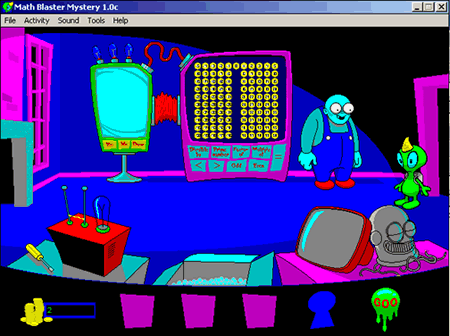 Figure 1. Math Blaster Mystery screenshot demonstrating the Martian visiting a room in the mansion (Davidson & Associates, 1994).
An example of software in this category is Pre-Algebra Math Blaster Mystery (Davidson & Associates, 1994). This program is designed to reinforce skills already learned in pre-algebra. There is an emphasis on computation, estimation, proportions, ratios, and percents. Students play a game, as a character travels through a haunted mansion solving arithmetic problems (see Figure 1). Once they have completed several of the mathematics questions in three different categories appropriately and correctly, students get an opportunity to play a video game. The video game, that is built into the framework of the software, is the reward students earn by answering the mathematics exercises correctly.
With well-designed review and practice software, the role of technology is to reinforce skills through an optimal sequence that assures certain predictable outcomes (Hooper & Hokanson, 2000). Technology used in this way is an extension of the behavioral approach. Students are often rewarded with applause, games, or other “fun” activities after completing the mathematics problems; there is a frame of mind that the mathematics itself is not “fun” but rather a chore that will be rewarded if done correctly. In addition, personalization sometimes occurs with review and practice software that provides a congratulatory response using the student’s name. If students cannot solve a specific problem, they are provided other opportunities. If students are repeatedly unsuccessful, incorrect answers may be eliminated, students may be given hints or procedures to solve the problem, or they may be moved to a lower level of difficulty.
Partially because of these issues, evaluations of review and practice software have been negative. Salomon (2000) stated that use of review and practice applications is merely a repackaging of traditional teaching methods, with the content being displayed “a bit faster and a bit nicer” (p. 2). In other words, no harm is done, but no good is done either. The types of problems provided with review and practice software can easily be provided to students in a textbook or with a worksheet. The software does not add anything above and beyond what is done with a direct-instruction approach utilizing a lecture format. One might argue that review and practice software provides direct feedback not always possible with a worksheet or textbook. This is a benefit, assuredly. However, it is only valuable if the software can display the correct process to the answer with scaffolding questions built in. If the software simply provides a “yes” or “no” to the student response, it is no better than giving the student the answer to the problem on a worksheet or in a textbook.
Many researchers caution against the use of technology to present material in a delivery manner that does not enhance student processing of information (Oliver, 2000). Having students practice the mathematics in the same form in which it was presented does not allow the student to think about the process and the mathematical application or apply the student’s knowledge to the mathematics (Oliver, 2000). Instead, actively engaging students in mathematical thinking and discovery can promote a more cohesive understanding of mathematics.
General Software
When software is designed for use across a variety of mathematical topics, it can be termed a “general” software. General software is designed for many different applications. Teachers must examine the area of mathematics in which the software will be used and develop lessons that promote the type of learning on which they will focus. General software often can be used for a wide range of grade levels and mathematical subjects.
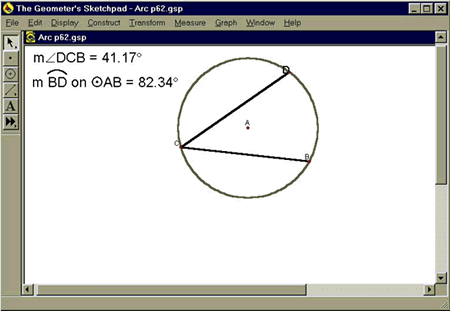 Figure 2. Geometer’s Sketchpad screenshot illustrating the relationship between arc-length and angle (Jackiw, 1995).
The Geometer’s Sketchpad (Jackiw, 1995) is an example of software designed for general use. This dynamic geometry program has gained respect for its potential to assist teachers implementing the NCTM standards by providing students with the possibility of testing conjectures about geometric shapes, relations, and transformations. A dynamic geometry program allows the user to construct, measure, and manipulate what is displayed on the screen, providing immediate feedback as the object changes size or shape (Hannafin, Burruss, & Little, 2001). Measures are also shown on the screen, changing as the student manipulates the object(s) (see Figure 2). Healy and Hoyles (2001) noted that the Geometer’s Sketchpad allows learners to drag and move their objects without having to redo the drawing, thereby giving learners more time to think about geometry rather than spending time reconstructing figures. It provides students with the ability to make discoveries that would not be possible with the use of paper, pencil, and a textbook. There are several advantages of general software:
- Students are provided opportunities to see the mathematics they have programmed in the computer immediately and rapidly. These opportunities allow them to make immediate judgments and provide convincing arguments about the validity of results (Dugdale, 1999).
- A laboratory-like setting is possible in which students can investigate mathematical problems and make discoveries of mathematical concepts by experimenting with inputs and looking at the validity of outputs provided by the software (Drier, 2001).
- The tools available in general software allow students to manipulate objects quickly and provide a visual model of conjectures or tests, facilitating a search for patterns or generalizations (Drier, 2001).
- These programs support cognitive efficiency, letting the computer do complex computations or repeated measures for the student (Hooper & Hokanson, 2000). For example, a student can generate a conjecture and run repeated tests to try to find counterexamples to a student-formulated rule.
- The student must critically consider examples to determine the validity of a rule. General software will allow the learner to discover mathematical relationships through their experimentations (Drier, 2001).
Specific Software
Software designed to emphasize learning in a particular area of mathematics is an example of “specific” software. The focus with specific software is the learning of a distinct mathematical topic, such as fractions, reflections, polygons, order of operations, right triangles, proportions, ratios, the Pythagorean theorem, and so on. This software differs from the review and practice category in that the focus is on learning new content, not reviewing a specific mathematical concept. Moreover, this category differs from the general category in the fact that the topic is more focused. For example, the Geometer’s Sketchpad is general because it can be used in multiple areas of geometry; a specific geometry software might be used only for right triangles.
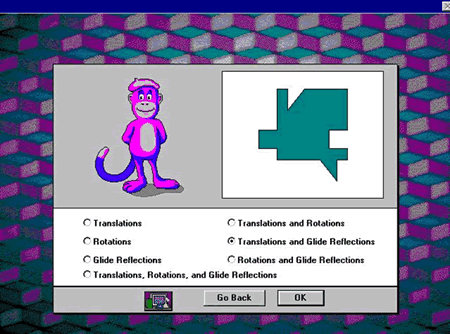 Figure 3. TesselMania screenshot demonstrating the variety of tessellations available for exploration (Learning Company, 1997).
TesselMania (Learning Company, 1997) is a unique example of specific software. TesselMania, while not heavily researched, has promise as a technology that promotes mathematical thinking and a comprehensive understanding of terms related to shapes and transformations. TesselMania is a program allowing students to create tessellations based on the ideas of Escher. The mathematical emphasis with TesselMania is on rotations, translations, and glide reflections in transformational geometry, including combinations of the concepts that can be used in the tessellation process (see Figure 3). The program has the potential to support critical thinking and deep conceptual understanding of these concepts.
The affordances of specific and general software are similar. The difference lies in the ease of application. Whereas general software, which is applicable across a wide domain, may have a steep and long learning curve, specific software, which is focused, generally take less time to learn. However, because they are specific, transfer of learning across domains may be inhibited. Specific software provides students more focused feedback, allowing for the computer to tutor the student. These can be quite sophisticated, with the direction of the software path being determined by the student’s correct or incorrect response. Specific feedback is provided, which gives the student appropriate guidance to learn the new material (Roblyer & Edwards, 2000). Like software in the general category, specific software allows students to experiment with the software, easily testing mathematical ideas; students can see the effects of their operations on the mathematical system that is displayed and obtain direct feedback from the software that is specific to their commands (Jensen & Williams, 1993).
Environment Software
Software used as an environment incorporates different types of information, mathematical topics, and contextual anchors in a variety of subject areas. This class of software provides a contextual setting not normally possible in the classroom, allowing students to make investigations into complex, often real-world applications of mathematics. Environment software provides a virtual place for students to guide their mathematical learning, taking students to a new place without requiring them to leave the classroom. Sometimes, this type of software is hard to measure against specific content objectives because so many avenues of exploration, mathematical topics, and subject areas are encompassed in the design of the software. Studies have shown that classrooms that have used such instruction exhibit gains in higher level tests in multiple areas (Hickey, Moore & Pellegrino 2001). Students show an increase in their self-concept and interest in mathematics in addition to greater competence (Hickey et al., 2001; see also Vye et al., 1997).
Environment software is generally designed for cooperative investigations. The teacher does not present tasks to the student. Rather, the teacher acts as a facilitator by assisting the students as they request help, posing questions, or providing comments to keep students on track or clarifying what students are learning.
The Jasper Project (Cognition and Technology Group at Vanderbilt, 1997) is an example of software that can be utilized as an Environment tool. (Jasper is an example of an “anchored instruction” module. Anchored instruction is an environment as we define it; however, it would be remiss to assume that all environments are developed under the model of anchored instruction.) The Jasper Project consists of a series of computer-based videos that present mathematical questions based on scenarios utilizing real-world examples. The videos include problem-solving environments that promote mathematical thinking through their scaffolded design (Nicaise, 1997). There are 12 scenarios, each with an emphasis on either distance/rate/time, statistics and probability, geometry, or algebra and designed for use with students in Grade 5 and up (Cognition and Technology Group at Vanderbilt, 1997). Students view an approximately 20-minute video via the computer; after the video, students are given a challenge. To solve the challenge, students must identify goals that relate to the solution of the challenge and must decide what information from the video is relevant and how it applies to the solution (Goldman, Zech, Biswas, Noser, & The Cognition and Technology Group at Vanderbilt, 1999).
There is an emphasis on having students solve the predicament in groups, with the teacher acting as a facilitator. The challenges involve understanding relationships among the components of the challenge. Work on the Jasper project with students has been successful in “measures of mathematical self-efficacy, academic interest in, and value for mathematical content and problem solving,” including higher standardized achievement scores (Nicaise, 1997, p. 453).
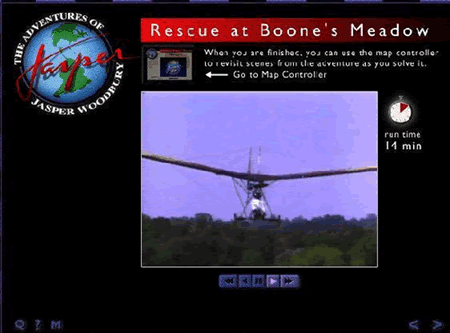 Figure 4. Jasper Project, Rescue at Boone’s Meadow screenshot demonstrating the ultralight plane (Cognition and Technology Group at Vanderbilt, 1997).
A specific example is Rescue at Boone’s Meadow. For the challenge, students must try and find the most effective way to rescue a wounded eagle using the information provided in the video. Most will use an ultralight plane that was showcased (see Figure 4) in the video, along with the information needed to operate the plane (for example, fuel, plane speed, wind speed, etc.; Cognition and Technology Group at Vanderbilt, 1997). “What-if” scenarios can supplement the lesson, (e.g., If the wind speed was stronger, then what would be the best way to rescue the eagle?).
Communication Software
Communication software is software designed for displaying and sharing information between students and another party or parties. The other parties can be the instructor, other teachers, students, or professionals (in education or outside of the field). The idea is to increase awareness of mathematical concepts through discourse, often at a distance, that transcend traditional boundaries of time and space related to classroom instruction.
There are two ways in which communication software can be used. The first involves only members of the community, specifically the teacher and the students. Teachers and students respond to one another and communicate their views, beliefs, and knowledge through online discussions or message boards. In this type of environment, the teacher and the students no longer play traditional roles in which the teacher is knower and the student is receiver of knowledge; rather, communication becomes a two-way dynamic system (Jarvela, Bonk & Lehti, 1999).
The second type of communication software involves members outside of the community, with hopes of creating a new community of learners. For example, teachers and students in Los Angeles may communicate with a similar classroom in Munich, Germany, with mathematical situations and quandaries. The desire is that a community will develop that shares knowledge and beliefs about mathematics. Another example would be putting students in contact with people who use mathematics professionally so that students can improve their understanding of mathematical use in the real world.
When we decide to learn something in the real world, we usually seek authentic experience with that topic. We participate in the learning rather than playing the role of a neutral bystander (Jonassen et al., 1999). When students actively engage in their leaning through communication software, an atmosphere develops in which all participants have an opportunity to gain insight into the topic.
Fostering communities of learning through the use of technology enables students to learn through the heuristic structure of the communication. The technology provides storing, organizing, and reformulation of ideas presented by community members (Jonassen et al., 1999). Students have an opportunity to go back and look at discussions that occurred previously and reformulate their thoughts if necessary. They also can review the discussion and reflect on the topic if desired. Groupware, videoconferencing, chats, electronic bulletin boards, e-mail, and listservs are examples of software developed for use as communication tools (Jonassen et al., 1999).
This type of software has several advantages to learning (Sherer & Shea, 2002). It provides students with longer wait time than do classroom discussions and permits students to consider an issue in more detail than when they must quickly answer a question posed in class. When communication software is utilized, participation by all students is also possible, thereby allowing all students to reflect and ponder subjects, which is not always possible in a traditional classroom setting. Communication software provides more opportunity for interactions among students and instructors, enabling students to take a more active role in their learning. In traditional classroom settings, the instructor may not be able to question and engage all students and provide each student with individualized wait time; communication software affords this ability.
The use of communication software also promotes higher order cognitive skills (Sherer & Shea, 2002). Challenging questions can be posted with students providing feedback, supporting or countering arguments, and challenging statements. No ideas are lost in this strand of feedback. The software displays the wisdom of each individual participant. All of the participants have an opportunity to engage in critical thinking through problem-solving or in-depth discussions by posting their statement or question to the rest of the group.
Conclusion
Why is a taxonomy of technological software important for mathematics teacher preparation and professional development? Throughout this paper we have illustrated that each type of software available to the mathematics teacher offers both affordances, or enabling features, and constraints to learning in the mathematics classroom. The affordances embodied in a software tool enable the teacher to engage students in fundamentally different (e.g., more advanced, more visual, more focused) mathematics than they could have approached had the software not been present. The constraints they place on students’ activity allow the teacher to focus students’ thinking on the important concepts or skills and away from extraneous information that may misdirect attention or require additional cognitive load (Gerjets & Scheiter, 2003). The ways in which affordances and constraints are manipulated by the teacher, through task selection, choice of software, and instructional design determine what mathematics is possible and the ways in which students will approach it.
In summary, review and practice software is more supportive of direct, measurable objectives and emphasizes drill and practice techniques to support the instruction of mathematics. General software allows a student to use common programs to explore and solve problems in a wide variety of mathematical topics. This software grows with the child throughout the school year and can often be used across multiple years, making it both powerful and economical. Specific software allows students to use tools to investigate distinct mathematical topic(s), providing insight and knowledge into a specific domain. Environment software affords a range of possible investigations allowing students to experience “real” world applications of mathematics interactively. Such software allows for much more student control over problem solving and interpretation than the other types of software and also may support the development of logical, mathematical arguments.
Communication software enables discourse among students, collaborative learning, and out-of-class learning. In addition, this software supports assessment of student’s mathematical thinking by examining transcripts of student conversations (Kurz, 2004). In the classroom, allowing each student to speak and having a clear picture of every student’s thinking process is nearly impossible. Communication software is designed to allow teachers to have more awareness of their students and to allow students to learn from one another.
The taxonomy provides a framework to help teachers understand the ways in which students can learn from or with software and provides them opportunities to support different types of student learning. Teachers have notions about how students learn, whether they take a traditional approach to learning or a more constructivist approach. These five categories of software offer teachers ways to support students’ learning and challenge teachers to think about their approach to learning and how mathematics can be approached in different ways. Teachers can also consider how the particular constraints and affordances of the software they have at their disposal can be configured to maximize learning. To make this connection to learning, it is imperative that preservice and in-service teachers do more than read an article such as this one. Rather, they need opportunities to experience and evaluate software that fits into each category to determine the type of software that can support their own students’ mathematical growth (e.g., Kurz, 2004).
For teacher educators, this taxonomy provides a framework to introduce tool-based mathematics software in the university classroom. Often, teacher development in mathematics technology involves the use of a single program to teach a specific area of mathematics. When university instructors use this framework, they will have the potential to introduce five different software types that are more supportive of mathematical learning than a single software type. Teacher educators may reach more of their preservice and/or in-service teachers if they provide different examples for various philosophies of learning. The framework not only provides a way to introduce technology in mathematics education, but also provides a structure to discuss how students learn mathematics and whether some software is more meaningful and helpful for learning than others. After experiencing each type of software, university professionals can challenge their students to think about how the software may be used to support mathematical learning and growth.
This argument is supported by a large literature base on instructional design. In particular, this literature emphasizes the importance of understanding how to use a piece of software in support of student learning and in what specific ways the software enhances mathematics instruction. The structure we have outlined here has proven useful in growing preservice teachers’ ability to distinguish among software applications and anticipate their intended usage in the mathematics classroom. In particular, when teachers are asked to compare software of different type and to discuss what kinds of knowledge they engender (building on Squires & Preece, 1996; Squires, 1997) and at what points in the curriculum they should be used, we have found that they develop more pedagogically rich conceptions of and positive attitudes toward technology (Kurz, 2004).
References
Akpinar, Y., & Hartley, J. (1996). Designing interactive learning environments. Journal of Computer Assisted Learning, 12, 33-46.
Barnes, J. (1997). Modeling dynamical systems with spreadsheet software. Mathematics and Computer Education, 31(1), 43-55.
Brouwer, P. (1996-1997). Hold on a minute here: What happened to critical thinking in the information age? Journal of Educational Technology Systems, 25(2), 189-197.
Cognition and Technology Group at Vanderbilt. (1997). The Jasper project: Lessons in curriculum, instruction, assessment and professional development. Mahwah, NJ: Lawrence Erlbaum Associates.
Connell, M. (1998). Technology in constructivist mathematics classrooms. Journal of Computers in Mathematics and Science Teaching, 17(4), 311-338.
Davidson & Associates. (1994). Math blaster mystery (Windows version) [Computer software]. Torrance, CA: Davidson & Associates.
Davies, C. (2002). Student engagement with simulations: A case study. Computers and Education, 39, 271-282.
Dede, C. (2000). Emerging influences of information technology on school curriculum. Journal of Curriculum Studies, 32(2), 281-303.
Drier, H. (2001). Teaching and learning mathematics with interactive spreadsheets. School Science and Mathematics, 10(4), 170-179.
Dugdale, S. (1999). Establishing computers as an optional program solving tool in a nontechnological mathematics context. International Journal of Computers for Mathematical Learning, 4, 151-167.
Flores, A., Knaupp, J., Middleton, J., & Staley, F. (2002). Integration of technology, science, and mathematics in the middle grades: A teacher preparation program. Contemporary Issues in Technology and Teacher Education [Online serial], 2(1). Retrieved June 21, 2005, from https://citejournal.org/vol2/iss1/mathematics/article1.cfm
Gerjets, P., & Scheiter, K. (2003). Goal configurations and processing strategies as moderators between instructional design and cognitive load: Evidence from hypertext-based instruction. Educational Psychologist, 38(1), 33-41.
Goldman, S., Zech, L., Biswas, G., Noser, T., & the Cognition and Technology Group at Vanderbilt. (1999). Computer technology and complex problem solving: Issues in the study of complex cognitive activity. Instructional Science, 27, 235-268.
Handal, B., & Herrington, A. (2003). Re-examining categories of computer-based learning in mathematics education. Contemporary Issues in Technology and Mathematics Teacher Education [Online serial], 3(3). Retrieved June 16, 2005, from https://citejournal.org/vol3/iss3/mathematics/article1.cfm
Hannafin, R., Burruss, J., & Little, C. (2001). Learning with dynamic geometry programs: Perspectives of teachers and learners. The Journal of Educational Research, 94(3), 132-144.
Healy, L., & Hoyles, C. (2001). Software tools for geometrical problem solving: Potentials and pitfalls. International Journal of Computers for Mathematical Learning, 6, 235-256.
Hefzallah, I. (1999). The new educational technologies and learning. Springfield, IL: Charles C. Thomas, Publisher.
Hickey, D. T., Moore, A. L., & Pellegrino, J. W. (2001). The motivational and academic consequences of two innovative mathematics environments: Do curricular innovations and reforms make a difference? American Educational Research Journal, 38(3), 611-652.
Hooper, S., & Hokanson, B. (2000). The changing face of knowledge. Social Education, 64(1), 28-31.
Jackiw, N. (1995). The geometer’s sketchpad [Computer software]. Berkeley, CA: Key Curriculum Press.
Jarvela, S., Bonk, C., & Lehti, E. (1999). A theoretical analysis of social interactions in computer-based learning environments: Evidence for reciprocal understandings. Journal of Educational Computing Research, 21(3), 363-388.
Jensen, R., & Williams, B. (1993). Technology: Implications for middle grades mathematics. In D. Owens & S. Wagner (Eds.), Research ideas in the classroom: Middle grades mathematics (pp. 225-243). New York: Macmillan Publishing.
Jonassen, D., Howland, J., Moore, J., & Marra, R. (1999). Learning to solve problems with technology: A constructivist perspective. Columbus, OH: Merrill Prentice Hall.
Jonassen, D. H., & Reeves, T. C. (1996). Learning with technology: Using computers as cognitive tools. In D. H. Jonassen (Ed.), Handbook of research on educational communications and technology (pp. 693-719). New York: Macmillan.
Kurz, T. (2004). Preservice teachers and tool-based mathematics software: Does experience lead to changes in thinking? Unpublished doctoral dissertation, Arizona State University, Tempe, AZ.
Koedinger, K. R., & Anderson, J. R. (1998). Illustrating principled design: The early evolution of a cognitive tutor for algebra symbolization. Interactive Learning Environments, 5, 161-180.
Lajoie, S. (1993). Computing environments as cognitive tools for enhancing learning. In S. Lajoie & S. Derry (Eds.), Computers as cognitive tools, (Vol. 1, pp. 261-288). Hillsdale, NJ: Lawrence Erlbaum Associates.
Learning Company. (1997). TesselMania deluxe [Computer software]. Minneapolis, MN: Author.
Lederman N., & Niess, M. (2000). Technology for technology’s sake or for the improvement of teaching and learning? School Science and Mathematics, 100(7), 346-8.
Levi, I. (1997). A note on using maple to teach linear algebra. Modeling dynamical systems with spreadsheet software. Mathematics and Computer Education, 31(1), 182-9.
National Council of Teachers of Mathematics. (2002). Principles and standards for school mathematics. Retrieved June 21, 2005, from http://standards.nctm.org
Nicaise, M. (1997). Computer-supported apprenticeships in math and science. Journal of Computers in Mathematics and Science Teaching, 16(4), 443-465.
Oliver, K. (2000). Methods for developing constructivist learning on the web. Educational Technology, 40(6), 5-18.
Pea, R. D. (1986). Cognitive technologies for mathematics education. In A. Schoenfeld (Ed.), Cognitive science and mathematics education (pp. 89-122). Hillsdale, NJ: Erlbaum.
Piburn, M.D., & Middleton, J.A. (1998). Patterns of faculty and student conversation in listserv and traditional journals in a program for pre-service mathematics and science teachers. Journal of Research in Computing in Education, 33(1), 62-77.
President’s Committee of Advisors on Science and Technology. (1997). Report to the President on the use of technology to strengthen K-12 education in the United States. Washington DC: U.S. Government Printing Office.
Roblyer, M., & Edwards, J. (2000). Integrating educational technology into teaching. Upper Saddle River, NJ: Prentice-Hall.
Salomon, G. (2000). It’s not just the tool but the educational rationale that counts. Keynote address presented at Ed-Media, Montreal, Quebec, Canada. Retrieved June 21, 2005, from http://construct.haifa.ac.il/~gsalomon/edMedia2000.html
Sherer, P., & Shea, T. (2002). Designing courses outside the classroom: New opportunities with the electronic delivery toolkit. College Teaching, 50(1) 15-20.
Squires, D. (1997). A heuristic approach to the evaluation of educational multimedia software. Retrieved June 21, 2005, from http://www.media.uwe.ac.uk/masoud/cal-97/papers/squires.htm
Squires, D., & Preece, J. (1996). Usability and learning: Evaluating the potential of educational software. Computers and Education, 27(1), 15-22.
Taylor, R. (Ed.). (1980). The computer in the school: Tutor, tool, tutee. New York: Teachers College Press.
Vye, N., Goldman, S., Voss, J., Hmelo, C., Williams, S., & Cognition and Technology Group at Vanderbilt University. (1997). Complex mathematical problem solving by individuals and dyads. Cognition and Instruction, 15(4), 435-84.
Author Note:
Terri Kurz
California State University, Bakersfield
Email: [email protected]
James A. Middleton
Arizona State University
Email: [email protected]
H. Bahadir Yanik
Arizona State University
Email: [email protected]
The research reported in this manuscript was supported, in part, by a grant from the United States Department of Education (#P336B990064). The opinions expressed are solely those of the author and do not reflect the opinions of the United States Department of Education.
Table 1
Affordances and Constraints of Different Classes of Mathematics Software
| Software Type | Affordances | Constraints |
| Review and Practice |
|
|
| General |
|
|
| Specific |
|
|
| Environment |
|
|
| Communication |
|
|
